 Abacalist

 Português
How to use it
From a priced trip to the comparison.
Add the price as you shop
Tap the item and fill in the price: each, per kg, per liter or per pack, depending on the product.
Finish the trip
Only finished trips with prices go into the comparison.
Buy it again
Next time you buy the same product, add the price again. The app shows the one from your last purchase: if it didn't change, tap Use.
Open Reports
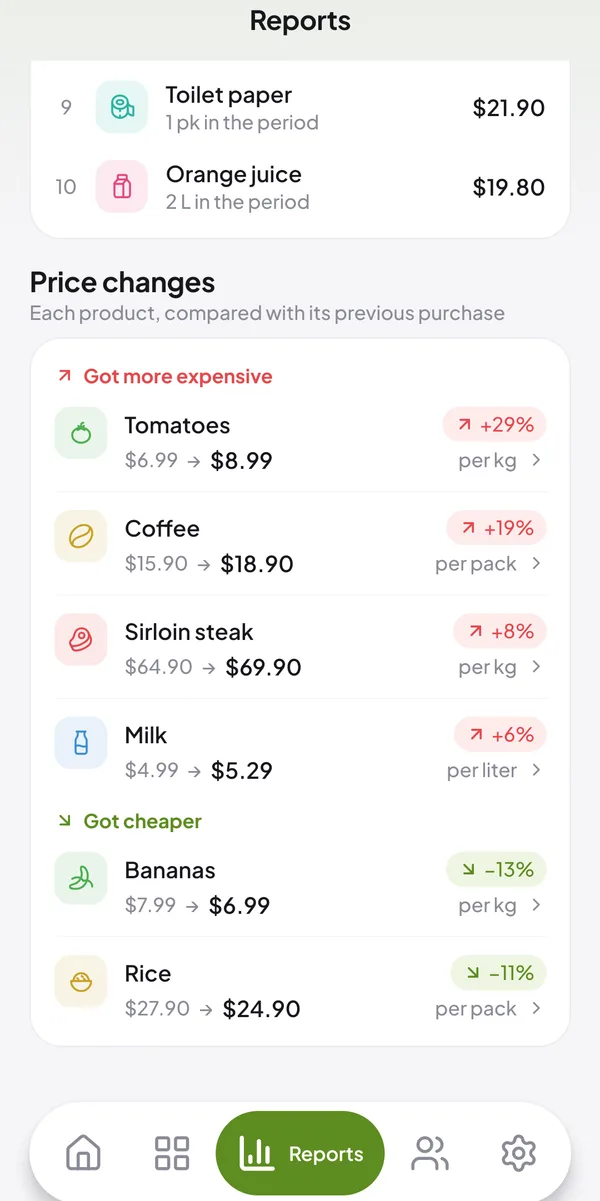
In the bottom menu, tap Reports and scroll down to Price changes.
See what went up and down
Products are split into Got more expensive and Got cheaper, with the percentage and the previous price next to the latest one.
Common questions
Quick answers to what people ask most.
How does the app compare prices?
By the same measure: per kg, per liter, per pack or each.
Why doesn't a product show up in the comparison?
It needs to be in two finished trips, both with a price.
Do I have to type the price every time?
No. When you add an item's price, the app shows the one from your last purchase: just tap Use.