 Abacalist

 Português
How to use it
From one item on the list to separate kinds.
Open the item
In the list, tap the item to edit it.
Tap Bought several kinds?
The option is right below the quantity.
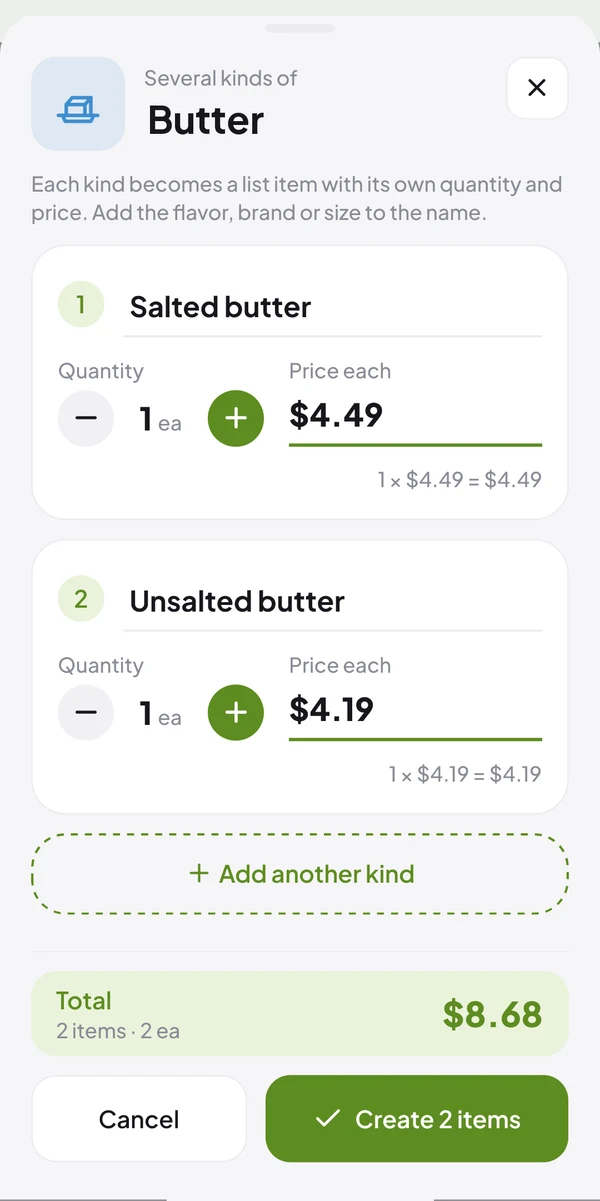
Complete the names
Each kind starts with the item's name. Add the flavor, brand or size (e.g. Salted butter).
Set quantity and price
Each kind has its own quantity and price. The total for all of them shows at the bottom.
Need one more?
Tap Add another kind.
Create the items
Tap Create items: each kind becomes a list item, in the same store section.
Common questions
Quick answers to what people ask most.
Is there another way to add a kind?
Yes. When you add a product that's already on the list, the app asks what to do: choose Another kind.
What if I just bought more of the same thing?
Then there's no need to split. Raise the item's quantity, or choose One more when the app asks.
Can two kinds have the same name?
No. Tell them apart by flavor, brand or size.