 Abacalist

 Português
How to use it
From creating the list to the checkout.
Set the limit when you create the list
On the home screen, tap + and fill in Spending limit with how much you want to spend on this trip. Leave it blank for no limit.
Or on a list you already have
Open the list, tap the three dots and choose Spending limit. From there you can also change the amount or remove the limit.
At the store, check off what you grab
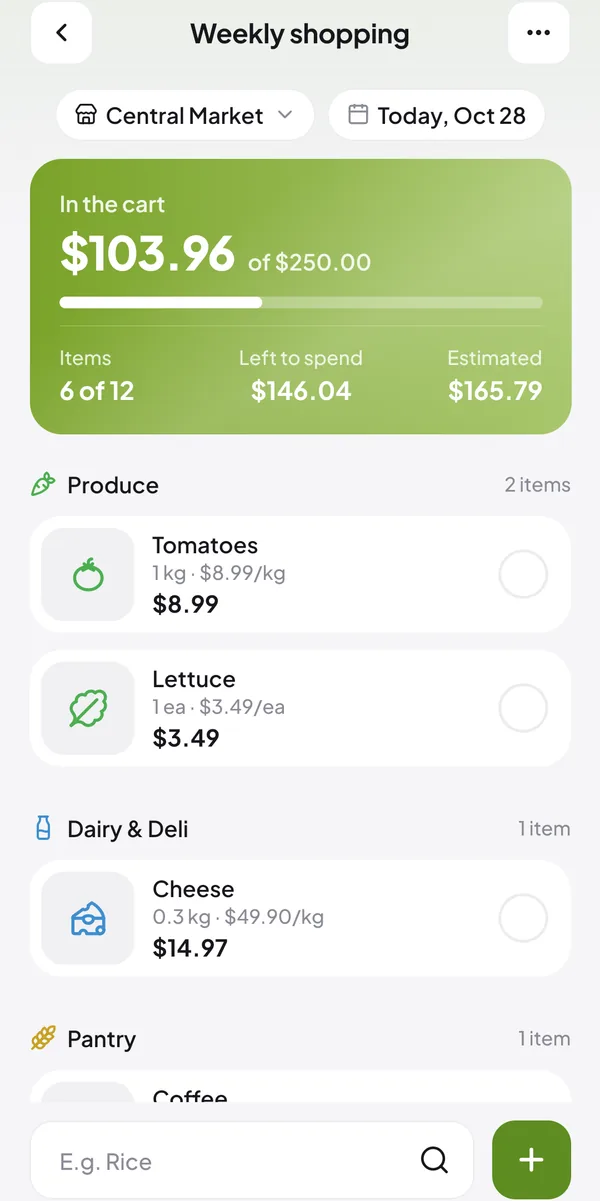
Tap the circle next to an item when it goes in the cart. If the item has a price, it's added to the total right away.
Follow the green panel
In the cart is what you've grabbed. Left to spend is what still fits in the limit, and Estimated is what the whole list should cost.
Watch for the warnings
Near the limit, the app tells you how much you've used and how much is left. If you go over, it shows by how much.
Finish the trip
When you finish, you see whether the trip stayed within the limit. The list moves to Finished with the total you spent.
Common questions
Quick answers to what people ask most.
Does the limit count what I haven't grabbed yet?
No. It only counts what's in the cart. What you still have to grab shows up in Estimated.
Do I need to add prices?
For the total and the estimate to be right, yes. Items without a price don't count.
Can I change the limit mid-trip?
Yes. Edit the list and change the amount, or tap Remove limit.
Read next
One of the habits is setting the amount before you leave home.
Article · 3 min readRead →